


Sizely
Size Guide · For shoe stores

Your shoe size page, with Size Match on top.

Your own shoe size tables for women, men and kids, in your store's look and your column order. A shopper names a pair they own, or their foot length, and the right row lights up. One line of code on any platform, in 13 languages.

Free to start. No credit card.

How it works

From your shoe size chart to a live size page.

  1. Pick your brand

    Search 450+ shoe brands and your women's, men's and kids' tables fill in from Sizely data where we have it. Not listed? Paste your chart or upload a screenshot.

  2. Make it look like your store

    Rename and reorder your columns, pick a layout, and set your accent, font and corners. Click any text or table cell on the preview to change it.

  3. Your code<script src="https://www.size.ly/g/guide.js" data-guide="YOUR-CODE" defer></script>

    Paste one line

    Publish, then paste one line of code where your size page goes. The guide sizes itself to the column it sits in.

On your size page

The answer and your tables on one page.

Your own tables

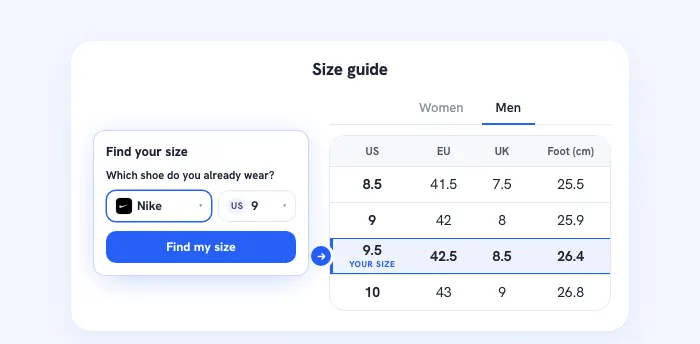
Shoe size tables for women, men and kids, with your columns in your order, such as US, EU, UK and foot length.

Size Match on top

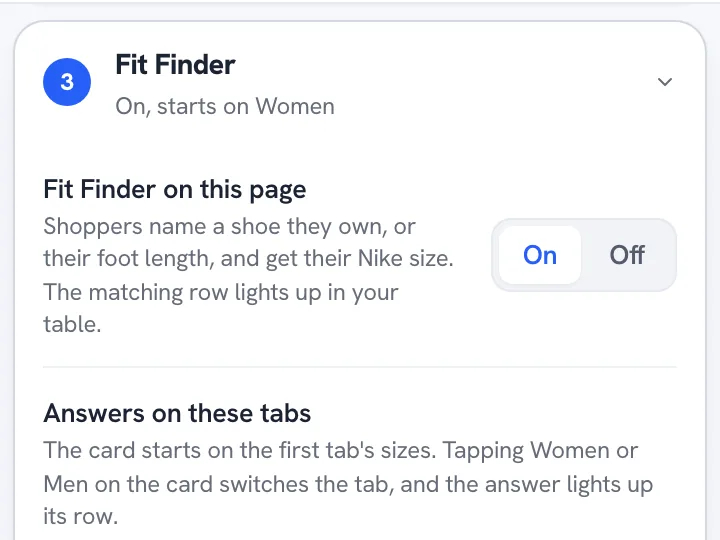
A shopper picks a pair they own and its size, or types a foot length, and the matching row lights up. It answers women's and men's shoe sizes. Kids' tables stay tables.

Or tables only

Switch Size Match off and the page is just your tables. A tables-only guide never uses opens.

Your store's look

Pick a layout and set your accent color, font, corners and table style, or take the look of your saved Size Match setup in one click.

In your shoppers' language

Add any of 13 languages. Sizely's texts are already translated, and shoppers see the language of the store page they are on.

Made for phones

Every layout works on a phone, tables-only guides included, and the guide never makes your page scroll sideways.

Install

One line of code on your size page.

Copy it from the builder, or email it to yourself, and paste it on your size page. The builder shows the steps for your platform.

On Shopify it goes in a Custom Liquid section, on WooCommerce in a Custom HTML block. Your theme's styles never reach inside the guide.

ShopifyWooCommerceAny site
Your code<script src="https://www.size.ly/g/guide.js" data-guide="YOUR-CODE" defer></script>
Plans

Build it free. Go live on Store or Brand.

Free to build

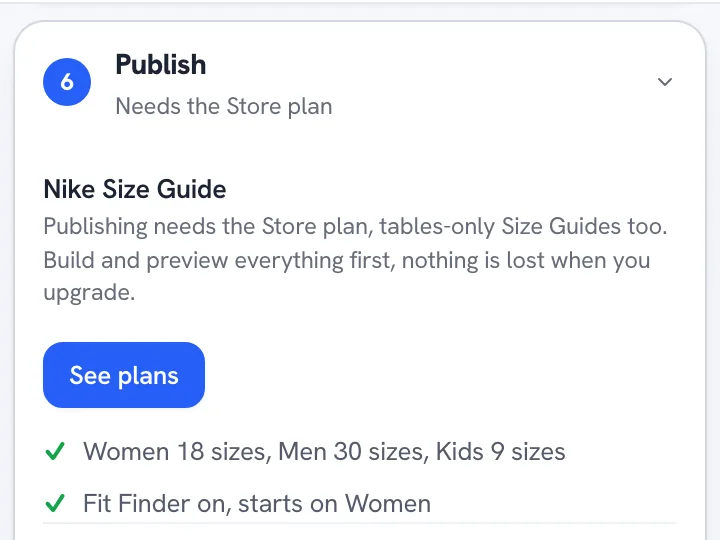
Build, style and preview your Size Guide on any plan, Free included. Nothing is lost when you upgrade.

Live with Store or Brand

Publishing needs Store or Brand, tables-only guides too. Below Store, the guide stops showing on your store.

One shared pool of opens

Size Match on your guide counts toward the opens your plan includes, 500 a month on Store and 2,500 on Brand, shared with the size tools on your product pages. An open is counted when a shopper uses Size Match, never on a page load.

Your page, your name

A small “Powered by Sizely” line sits under the guide. On Brand you can hide it.

Pricing · Size Guide

One public price, counted in opens.

An open is a shopper opening Size Quiz or Size Match on your store. Browsing is free, and nothing is billed without your click.

Free to start. No credit card. Set it up and preview it free, then go live on your store with Store or Brand.

Free

Any seller

A real chart on one listing, free.

$0
Free forever
  • Size tools on your storeComes with Store and Brand.
  • Size QuizNot included
  • Size MatchNot included
  • Size GuideNot included
  • Size tool opensNot included
  • Charts for your listings
  • Item Charts5/mo
  • Size Charts1/mo
  • Seller Studio credits5/mo
  • Garment designs30
  • Charts stay live30 days
  • Your brand, no watermarkNot included
Best for stores

Store

Your own store on Shopify or WooCommerce

Size tools that mean fewer returns.

$39/mo
$468 billed yearlySave $96/yr
  • Size tools on your storeShoppers find their size.
  • Size QuizIncluded
  • Size MatchIncluded
  • Size GuideIncluded
  • Size tool opens500/mo
  • Charts for your listings
  • Item ChartsUnlimited
  • Size Charts50/mo
  • Seller Studio credits50/mo
  • Garment designsAll 345
  • Charts stay liveForever
  • Your brand, no watermarkIncluded

Brand

Brands and retailers with more traffic

More opens, unlimited Size Charts.

$149/mo
$1,788 billed yearlySave $360/yr
  • Size tools on your storeShoppers find their size.
  • Size QuizIncluded
  • Size MatchIncluded
  • Size GuideIncluded
  • Size tool opens2,500/mo
  • Charts for your listings
  • Item ChartsUnlimited
  • Size ChartsUnlimited
  • Seller Studio credits100/mo
  • Garment designsAll 345
  • Charts stay liveForever
  • Your brand, no watermarkIncluded

Need more opens on Store or Brand? Booster packs add +1,000 opens for $89 a month each, up to 5.

Enterprise Over 7,500 opens a month? Priced on your orders, from $549 a month.

Book a 20 minute call→
Counted only when a shopper opens it
A dated notice before you reach your limit
Never billed automatically

Try it before you pay

1Build and preview free
2See it in our demo store
3Live on your store with Store or Brand
Run your own numbersA 8,000-visit shoe store: about 480 opens a month, fits Store
about 480
opens a month
if 6 in 100 visits open a size tool
Store
plan that fits
$39 a month, paid yearly
about 6
returns you might avoid
a month

Estimates, your numbers will differ.

Questions about price

What counts as an open?

A shopper opening Size Quiz or Size Match on your store. Each time a shopper opens it counts, and starting over counts as a new open. Seeing the button costs nothing, and page views are never counted.

What happens at my limit?

You get a dated notice before you reach it. On Store or Brand you can add Booster packs of 1,000 opens a month, and on Store you can move up to Brand. During any free trial and the first 30 paid days of your first Store or Brand plan, your size tools keep running past the limit while you decide, up to five times your plan's monthly opens in total. After that, if you add nothing, they pause for shoppers until you add opens or your next monthly reset. We never bill extra automatically.

Can I try it on my store first?

You can build it, style it and preview it free, and see it working in our demo store. It goes live on your store once you choose Store or Brand.

Can I cancel?

Yes, anytime. Your plan stays live to the end of the period you paid for.

FAQ

Questions from store owners

Do I need a developer?

No. You paste one line of code on your size page, and the builder shows the steps for your platform. Want help? Email yourself the code from the builder and reply to that email.

Does it use opens when nobody uses Size Match?

No. An open is counted only when a shopper starts using Size Match on the guide, and starting over counts as a new open. Loading the page, switching tabs and reading the tables cost nothing, and a tables-only guide never uses opens.

Can I try it before I pay?

Yes. Build your guide, style it and preview it free, and try a live Size Guide in our demo store. It goes live on your store once you choose Store or Brand.

What if my brand is not listed?

Paste your chart or upload a screenshot and your tables fill in. Your tables can go live at once. For a brand we do not have yet, Size Match waits for a sizing check by our team.

Which languages does it speak?

Sizely's texts come in 13 languages. Add the ones you want, and shoppers see the language of the store page they are on. Texts you write yourself stay yours.

Is it for shoes or clothing?

Shoes today. Size Match answers shoe sizes, and the tables fill in from shoe brand data. For clothing, add a Size Chart to each product page.

Turn your size page into an answer.

Build it free, preview it with your own tables, and go live with Store or Brand.

Free to start. No credit card.